
A modern personal finance app should be able to do more than simply record income and expenses. MoneyStats takes this next step: in addition to clear organization and meaningful visualizations, the app offers intelligent tools that noticeably simplify everyday financial management. In particular, the areas of artificial intelligence, automation, and shortcuts open up possibilities that many users are not yet aware of — and this is where enormous potential lies.
Artificial Intelligence: Managing Finances with Your Voice
MoneyStats is deeply integrated into the Apple ecosystem and uses AI features where they provide real value. With Siri, you can easily create new transactions using voice commands such as
“Create a new expense in MoneyStats!” or
“Add an income in MoneyStats!”
Siri learns your frequently used actions and workflows over time. The more you use these features, the more accurately relevant suggestions will be offered in the future. This makes recording transactions not only faster, but also more intuitive — without even needing to open the app.
Shortcuts: Custom Quick Entries for Everyday Use
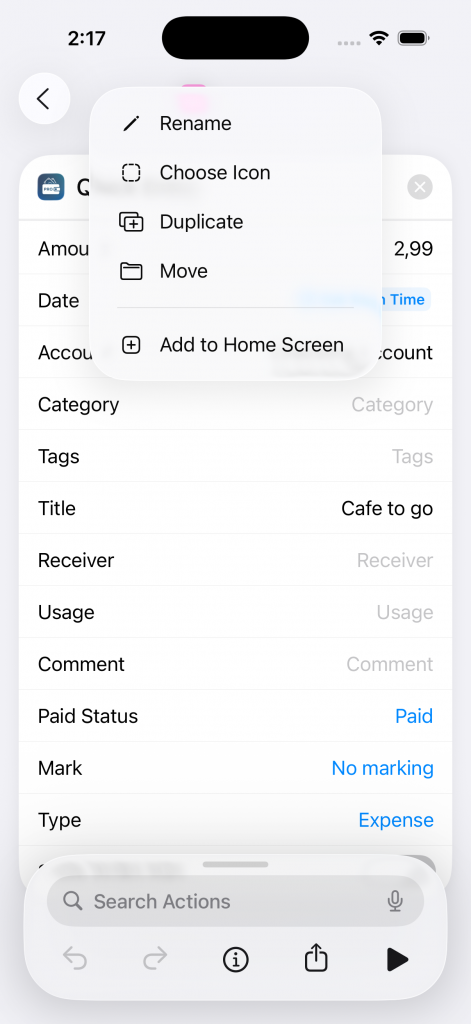
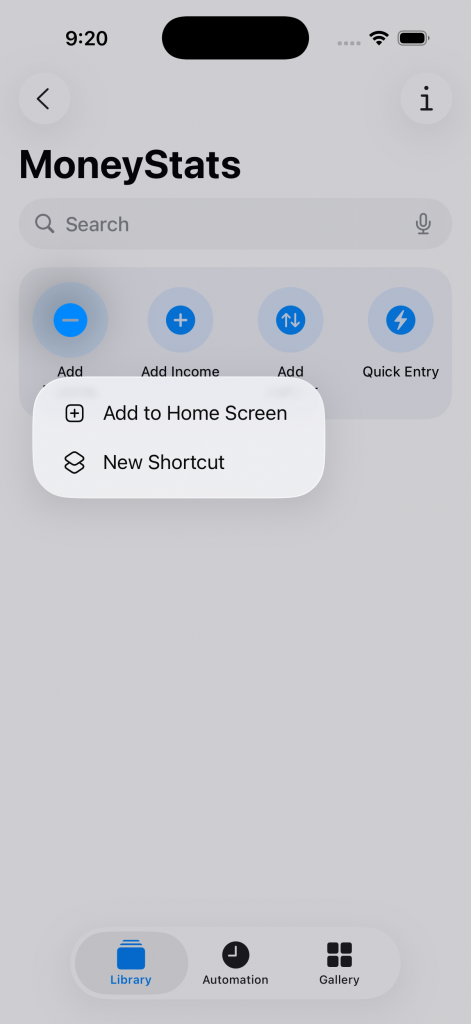
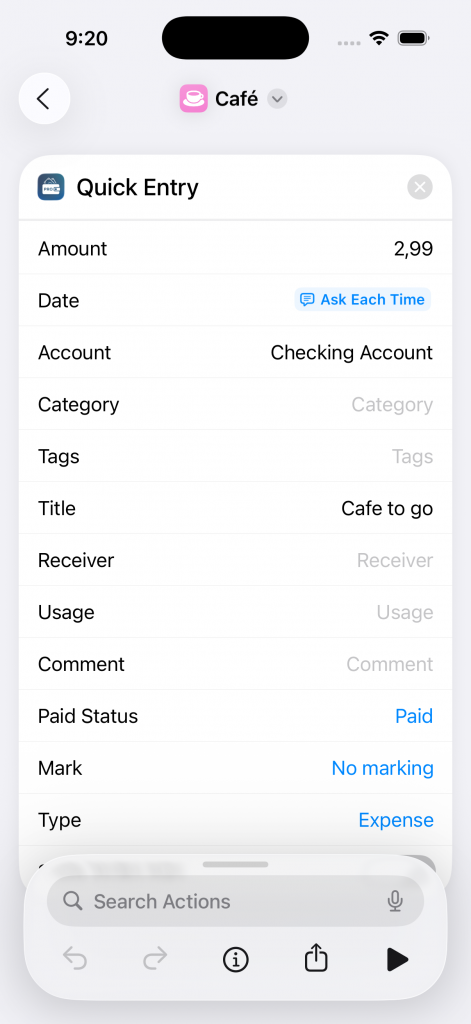
One particularly powerful tool is Shortcuts. In combination with the Apple Shortcuts app, you can create your own automations tailored perfectly to your daily routine. A typical example is your daily coffee on the go.
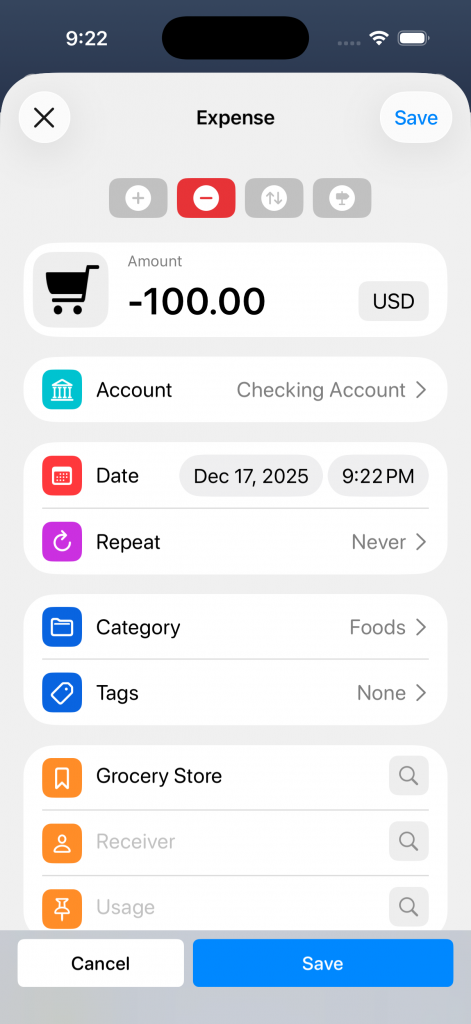
With just a few steps, you can create a custom quick-entry form and place it directly on your Home Screen. A single tap is enough, and the expense is immediately added to MoneyStats — including amount, category, and optional notes. This saves time and lowers the barrier to consistently tracking even small expenses.
Below a short step-by-step guide:


Automations and Hashtags: Intelligent Categorization
MoneyStats also offers numerous automation options directly within the app. In the Advanced Settings, you will find various automations that can be triggered manually. Particularly powerful, however, is the use of hashtags.
You can not only create categories in the traditional way, but also enhance them with hashtags. For example, you create the category “Groceries” and add hashtags such as “Walmart”, “Lidl”, “Supermarket”, or “Trader Joes”. These act as a form of sub-categorization. As soon as one of these terms appears in a transaction’s booking text, the transaction is automatically assigned to the “Groceries” category.
This becomes especially effective when combined with the new banking feature. When you import transactions from your bank account, MoneyStats automatically checks the booking texts and categorizes matching transactions without any additional manual effort.
For transactions that are not yet categorized, simply swipe right and tap the second icon from the left (“Change categorization”). If you assign a category such as “Salary”, MoneyStats will immediately suggest suitable hashtags based on the booking text, for example “Employer XYZ”, “XYZ”, or “Salary/Wages”. On the next import, your data will already be fully and correctly categorized.
An article about the power of hashtags, can be found here.
Privacy: AI as a Tool — Your Data Stays Private
When it comes to financial data, trust is essential. That’s why MoneyStats places the highest priority on privacy and data security. No personal financial data is ever sent to external AI services or servers. All AI and automation features are used solely as supportive tools within the existing system — for example, for voice control, structuring data, or automating workflows.
Your data stays exactly where it belongs: with you. MoneyStats leverages intelligent technologies without ever giving up control over your information.
Conclusion
With AI, shortcuts, and intelligent automations, MoneyStats takes a large part of the daily financial workload off your shoulders. Your finances are recorded, categorized, and analyzed almost automatically — privacy-friendly, efficient, and without additional effort. This allows you to maintain a clear overview at all times and focus on what truly matters.